Do Old Saves Work in 1.0? Character Transfer Explained
Old Early Access saves are not compatible with The Scroll of Taiwu 1.0. Here is what carries over, how the EA Classic Edition branch works, and how to transfer an engraved character.
Short answer
No. Early Access save files do not work in The Scroll of Taiwu: Beyond the Dome v1.0. The developer (ConchShip Games / 螺舟工作室) confirmed that the 1.0 update rebuilds the underlying systems, gameplay structure, and content framework so deeply that old save data cannot be carried into the new version.
Your old progress is not deleted. You can keep playing the preserved Early Access build through Steam's beta branches, and you can convert Imprinted Characters (刻印角色) from the old version into 1.0 using the standalone 铭刻迁移工具v1.0.exe the developer ships in the game folder (simplified by the June 17 day-one patch).
- Early Access saves are NOT compatible with 1.0.
- Old saves stay playable on the preserved test branch (build 0.0.79.83-test).
- Imprinted Characters (刻印角色) can be converted into 1.0; full saves cannot.
- Starting fresh in 1.0 is the cleanest way to see the new English tutorial and story content.
Why old saves break
The 1.0 release ends an eight-year Early Access run and reworks core systems rather than patching on top of them. Faction interactions, combat resources, attributes, and campaign structure all changed enough that the old save format no longer maps onto the new one.
Practically, a clean 1.0 start is also the best way to experience the new storylines, Taiwupedia onboarding, and rebalanced systems the way they were designed.
- 1.0 changed underlying systems, not just content.
- The save format itself is incompatible, not just specific values.
- A fresh start lines up with the new tutorial and balance.
- The English UI uses new terminology — see /glossary for verified launch-day terms.
Option 1: keep playing your old run (test branch / EA Classic)
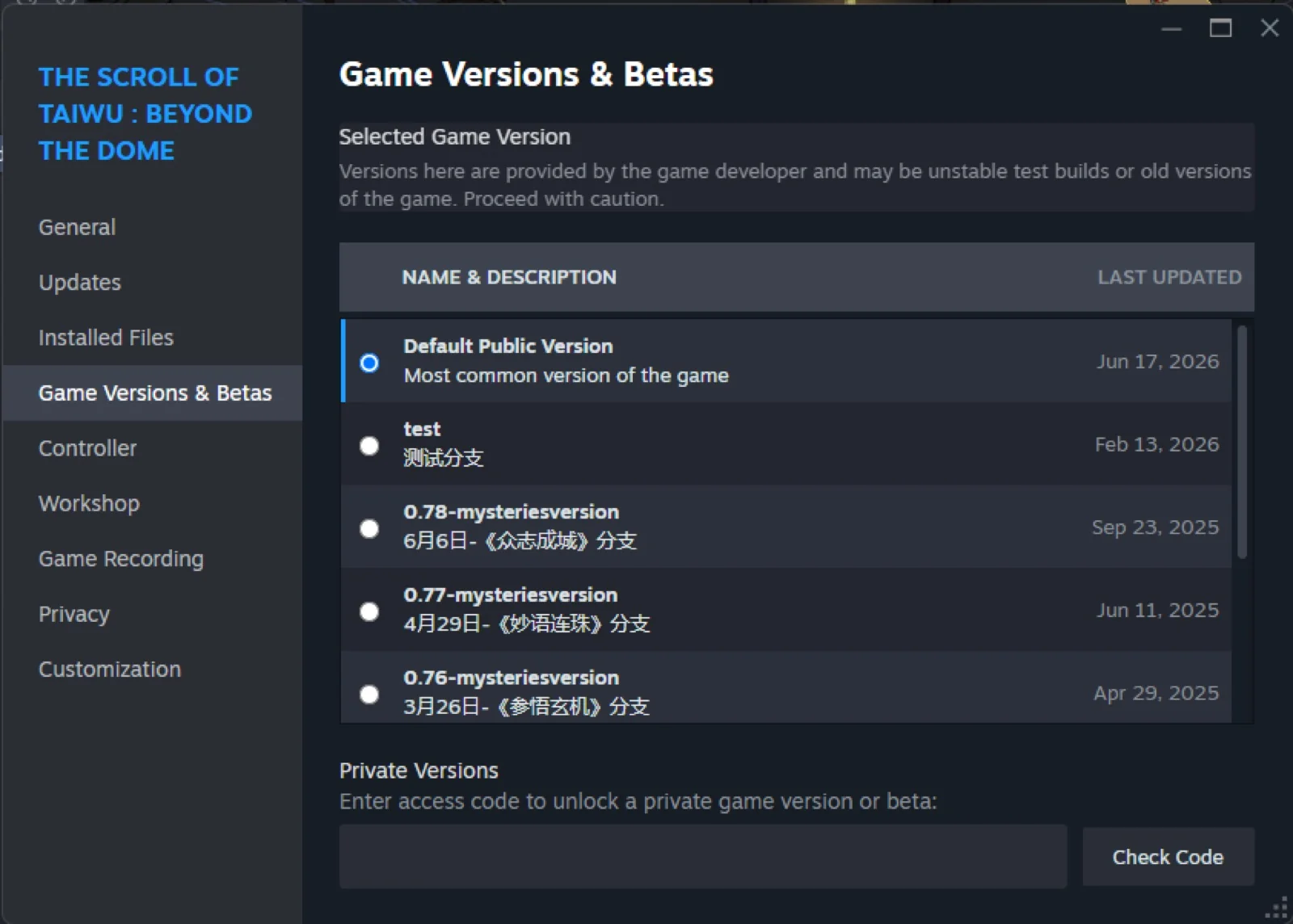
The developer preserves the final Early Access version as a permanent Steam beta branch. In the English Steam client on launch day, this appears as the **test** branch under Properties → Game Versions & Betas, not as a separate line labeled "EA Classic Edition".
Selecting **test** downloads the preserved Early Access build. The main menu shows version **0.0.79.83-test** and a Chinese-only interface — different from the 1.0 English client (0.84.75 on Default Public Version). Official announcements also refer to this preserved world as the EA Classic Edition.
- Steam → Library → right-click The Scroll of Taiwu: Beyond the Dome → Properties → Game Versions & Betas.
- Select **test** → wait for Steam to download → launch the game.
- Your existing Early Access saves work inside this branch.
- To return to 1.0 English: select **Default Public Version** and update again.
Option 2: transfer an Imprinted Character (刻印角色)
If you only want to carry a favorite character forward, the developer provides a one-click tool to convert an Imprinted Character (刻印角色) from the old version into 1.0. This migrates only the imprint, not an entire incompatible save.
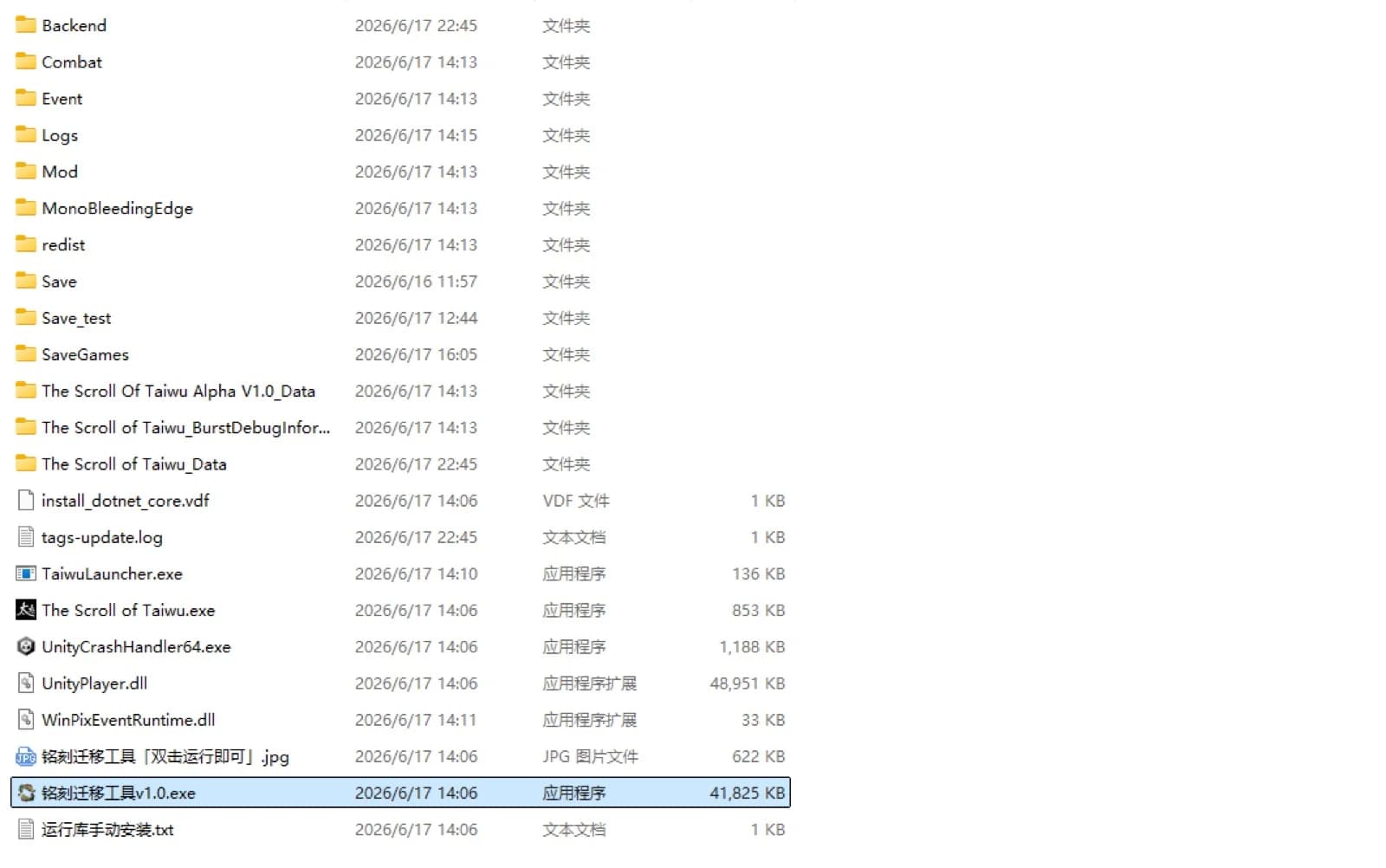
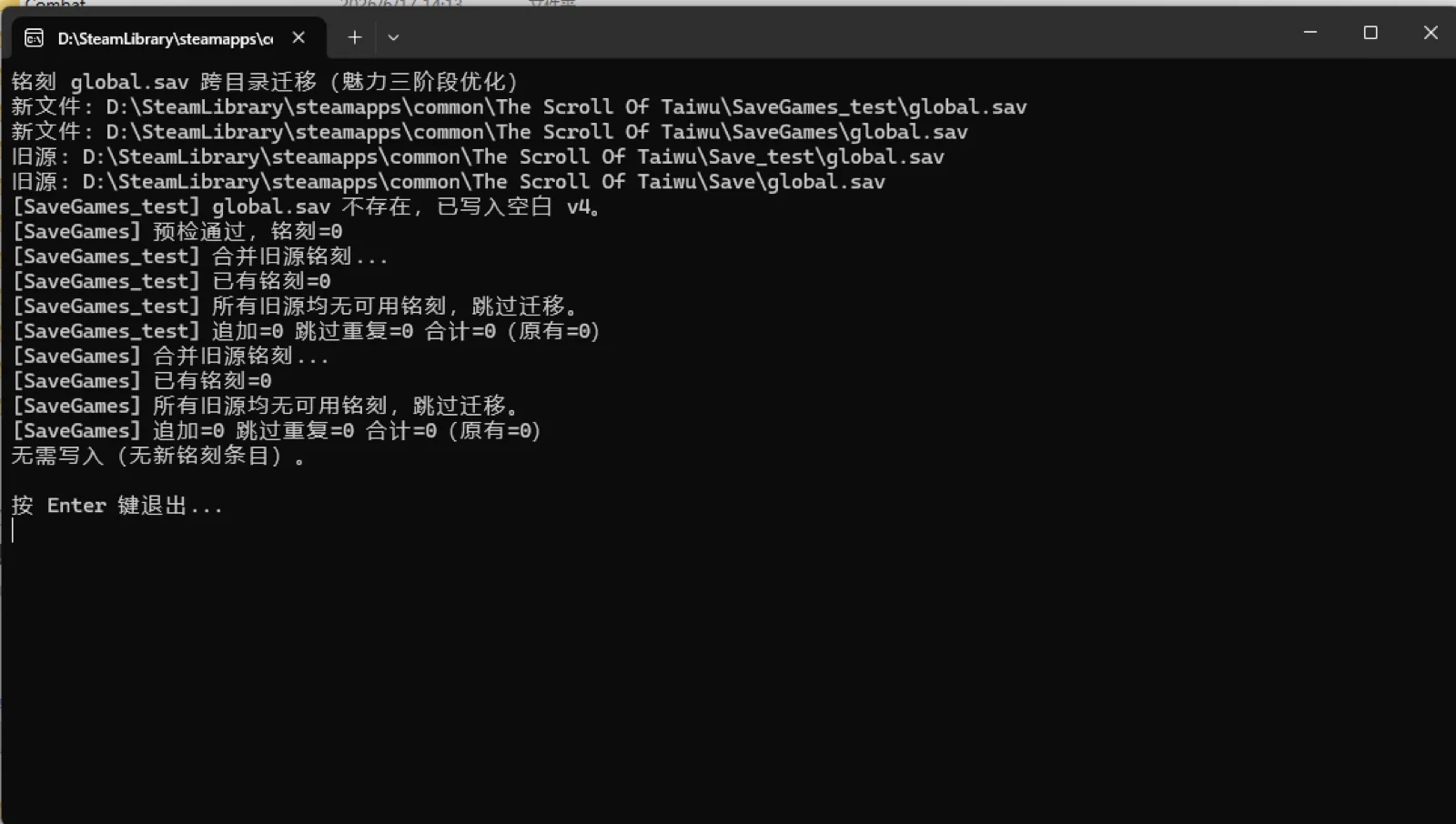
The June 17 day-one patch simplified this into a standalone tool. Open the game's install folder and double-click **铭刻迁移工具v1.0.exe** in the root directory (it sits next to The Scroll of Taiwu.exe). A console window opens, automatically merges any Imprinted Characters from your old **Save** and **Save_test** folders into the new **SaveGames** / **SaveGames_test** locations, prints the result, and waits for you to press Enter to close it. You do not need to clear any in-game tutorial gate for this method.
If your old folders contain no imprints, the tool reports that there is nothing to migrate and exits — that is expected, not an error. The in-game **Character Preset** button still exists on the main menu, but after the patch the standalone tool is the simplest one-step way to migrate old imprints.
- Open the install folder: Steam → right-click the game → Manage → Browse local files.
- Double-click **铭刻迁移工具v1.0.exe** in the root folder, then press Enter when it finishes.
- It auto-merges imprints from old **Save** / **Save_test** into **SaveGames** / **SaveGames_test**.
- Full saves cannot transfer; only Imprinted Characters (刻印角色) can.
- No imprints found = nothing to migrate (the tool says so and exits cleanly).
What you should do at launch
For most players, especially anyone new to the game in English, start a fresh 1.0 character on **Default Public Version** and follow the revamped tutorial. The new content is built around a clean start.
If you have meaningful old progress, decide whether you care about the whole campaign (stay on **test**) or only a specific imprinted character (transfer after Character Preset unlocks). You do not have to choose only one — the old branch stays available.
- New English players: Default Public Version → fresh 1.0 start → /beginner.
- Whole old campaign: switch to **test** branch and keep playing there.
- Favorite old character only: run 铭刻迁移工具v1.0.exe in the install folder to migrate the imprint.
- Screenshot your old run before switching branches, just in case.
Related paths
FAQ
Do my Early Access saves work in The Scroll of Taiwu 1.0?
No. Old Early Access saves are not compatible with 1.0 because the underlying systems were rebuilt. Your old saves still work on the preserved **test** beta branch (0.0.79.83-test).
Can I transfer my old character to 1.0?
You cannot migrate a full save, but the developer ships a one-click tool to transfer an Imprinted Character (刻印角色) into 1.0. After the June 17 patch it is a standalone program: open the install folder (Steam → right-click the game → Manage → Browse local files) and double-click 铭刻迁移工具v1.0.exe. It auto-merges imprints from your old Save / Save_test folders, then press Enter to close it.
The game won't launch or shows a loading error on 1.0 — how do I fix it?
On launch day a DLC update delay caused some clients to load an older DLC version and error out. Close the game, verify the game files (Steam → right-click the game → Properties → Installed Files → Verify integrity of game files) or restart the Steam client to pull the latest version, then relaunch.
Where is the EA Classic Edition branch in Steam?
On launch day it appears as the **test** branch under Properties → Game Versions & Betas. Official posts also call this preserved build the EA Classic Edition, but Steam may not show that marketing name yet.
Should new players start fresh in 1.0?
Yes. A fresh 1.0 start on Default Public Version lines up with the English tutorial, new storylines, and rebalanced systems.